
Endpoint protection and monitoring
Antivirus that nobody is watching is a comfort blanket. Protection only works when an alert reaches a person who does something about it.
Most small business endpoint protection fails quietly. A licence lapses. An agent stops reporting after a rebuild. A laptop that has been at home for six months has not had an update since it left. Nothing looks wrong, because nobody is looking.
Managed protection means somebody is looking. Every device reports into one console, we can see what is missing, and when something is detected it reaches an engineer rather than a notification bubble on a busy person’s screen.
The bit people skip
Encryption. A stolen or lost laptop with an unencrypted drive is a reportable data breach. With encryption switched on and the keys stored properly, it is a replacement laptop and an insurance claim. It costs nothing to turn on and it is one of the first things we check.
What is included
What you get
Protection on every device
Laptops, desktops and servers, including the machine in the corner everyone forgot about.
Central monitoring
One console showing what is protected, what is updating and what has stopped reporting in.
Alerts that reach a person
Detections come to us, and we act on them. This is the part that is missing in most small business setups.
Ransomware protection
Behaviour based detection that looks for what ransomware does rather than waiting to recognise a specific file.
Device encryption
Disk encryption switched on and the recovery keys stored properly, so a lost laptop is an inconvenience rather than a data breach.
Web and content filtering
Known malicious sites blocked before anyone reaches them, rather than relying on somebody noticing the address bar.
One product, chosen on purpose
We are standardising on Huntress. New clients start on it, and clients still on ThreatDown are being moved across. One product everywhere means we are not learning a different console on your network while something is going wrong.
Patching
Operating system and third party updates applied on a schedule, because unpatched software is how most malware arrives.
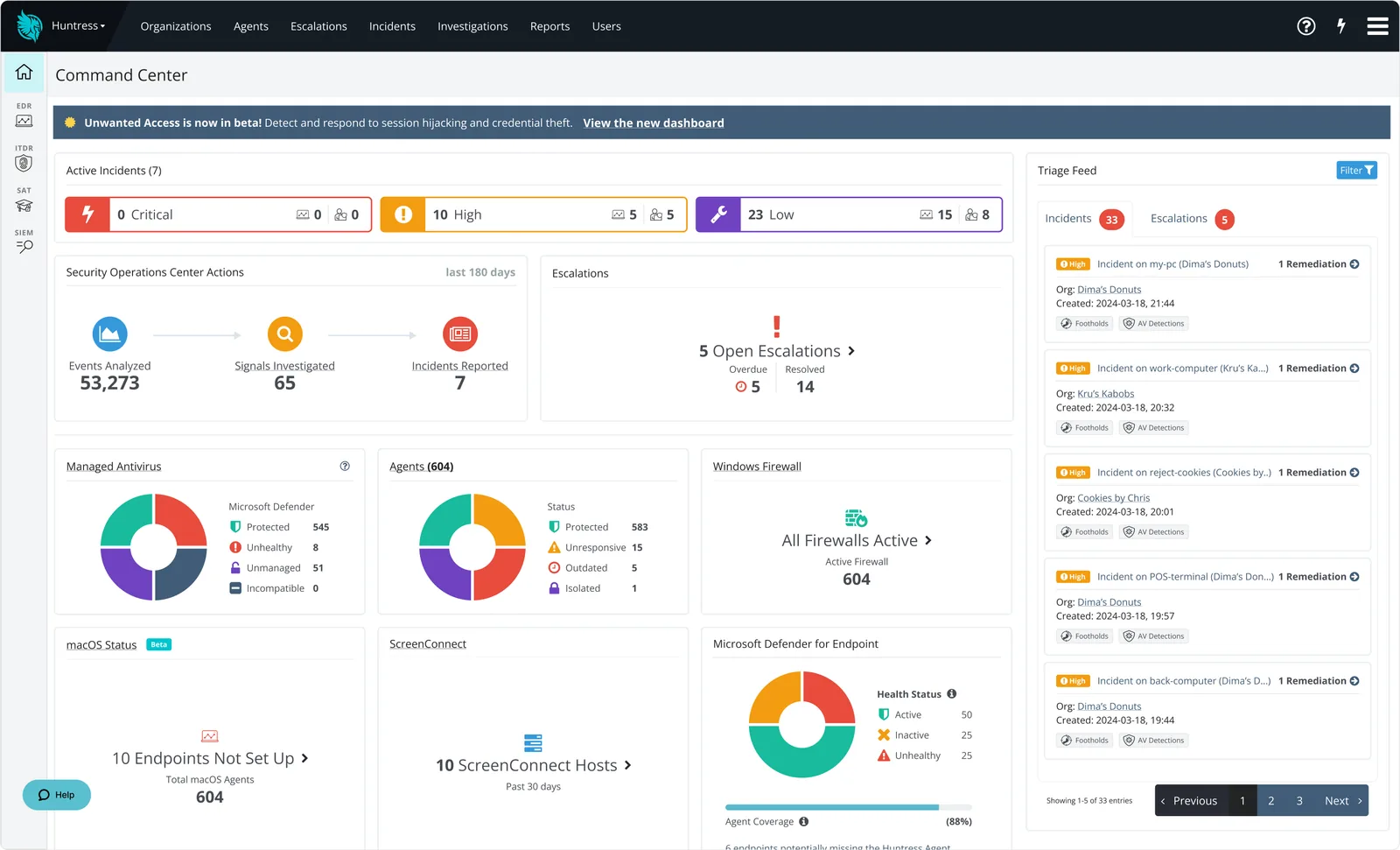
- Every device reports inThe laptop that has been at home six months shows up here, not in an audit.
- Gaps are visibleAn agent that stopped reporting after a rebuild is a number on this screen the same day.
- Triaged before you hearDetections reach the Huntress security operations centre and us first, not a pop up on a busy person.
Who we work with
How we work
What working with us looks like
- 1
Audit what is there
We find out what is actually installed and whether it is still working. It often is not.
- 2
Standardise
One product across all your devices, configured the same way, so there are no gaps and no conflicts. That product is Huntress, and we are moving everyone onto it.
- 3
Monitor and respond
Alerts come to us. We isolate an affected device rather than emailing you about it and waiting.
- 4
Report
You see what was detected and what happened next.
Included in Cyber Essentials
Malware protection is one of the five controls
If you are going for Cyber Essentials, endpoint protection is part of it. We handle both together.
Common questions
Is the antivirus built into Windows good enough?
Microsoft Defender is genuinely capable, and on its own in a small business it is usually unmanaged, which is the problem. What matters is whether the protection is configured consistently, reporting centrally and being watched. We can manage Defender or a separate product, depending on what suits your setup.
Which product do you use?
Huntress. We have been a ThreatDown partner, which is Malwarebytes' business range, and we are moving our clients from it onto Huntress. If you are an existing client still on ThreatDown, nothing lapses: we move you across as part of your support, not as a separate project you pay for.
What happens if a device gets infected?
We isolate it from the network, work out what happened, clean or rebuild it, and check whether anything else was touched. Then we tell you plainly what went on.
Do you cover Macs and mobiles?
Macs, yes. Mobile devices are managed through Microsoft 365 rather than endpoint protection, which we can also set up.
Does this replace backups?
No, and nothing does. Protection reduces how often something gets through. Backup is what gets you working again when something does.
Get in touch
Tell us what is not working
Send us a line about your setup and we will come back with what we would actually do about it. No sales pitch, no obligation.
Or call 01482 586 550 or email [email protected].
This form is provided by Growably. See our privacy policy.
Want a straight answer about your IT?
Tell us what is not working. We will tell you what we would do about it, with no sales pitch and no obligation.